

220 Views
Key Points:
- Fiber planning should support future bandwidth growth, not only current network needs.
- A clear backbone design helps reduce repeated rebuilding during later technology upgrades.
- Cable type and strand count should match distance, traffic, and future expansion plans.
- Well-planned pathways make future fiber additions easier and less disruptive.
- Organized equipment rooms support faster upgrades and simpler network management.
- Installation quality helps protect signal strength during heavy data use.
- Testing can find signal loss, weak splices, and damaged links before launch.
- Accurate records make future bandwidth upgrades faster and easier to plan.
- Spare capacity helps businesses add users, devices, and applications with less rework.
Commercial networks rarely stay the same for long. San Antonio businesses often add cloud tools, wireless access points, security cameras, video systems, connected equipment, and more users as they grow. Each change adds more traffic to the network backbone. If the cabling was built only for current needs, teams may face slow transfers, unstable links, or costly rebuilding whenever another upgrade begins across departments, floors, shared work areas, or important business systems.
Fiber gives commercial properties a stronger way to support long-term bandwidth growth, but the cable alone is not enough. The network must be planned around distance, equipment rooms, pathways, traffic levels, and future expansion. Careful design and skilled installation help teams add capacity without reopening ceilings or replacing major sections every few years. This practical approach makes upgrades easier to manage and reduces disruption across active business spaces during future technology changes.
Fiber Planning Reduces Repeated Network Rebuilding
A skilled fiber optic installer looks beyond the immediate project and considers how the network may grow over time. They review distance, traffic needs, equipment locations, and possible expansion points before choosing a design. This helps avoid short-term decisions that limit future speed. It also allows commercial teams to add capacity in planned areas without replacing the whole backbone or disturbing sections that already perform well during normal business use.
The design should divide the network into clear, manageable parts. Main backbone links, floor connections, equipment rooms, and high-demand zones should each have a defined role. This makes later changes more focused. If one department grows, technicians can improve that section without rebuilding unrelated areas. A clear design also makes troubleshooting easier because teams can follow the traffic path and find the link that may be causing a slowdown or unstable connection.
Bandwidth Growth Starts With Better Planning
A useful network plan starts with a clear view of how the business works today and how it may change. Teams should review user numbers, busy applications, device growth, building layout, and systems that cannot afford delays. They should also identify departments and shared resources that handle the most traffic. This information helps the project team build a backbone around real needs instead of rough estimates that may become outdated too quickly.
Read More: The 10 Best Photo to Video AI Tools of 2026
Planning should cover current equipment and likely future upgrades. A company may add another floor, expand wireless coverage, move more work to the cloud, or install higher-resolution cameras. These changes can raise traffic faster than expected. By mapping likely growth areas early, the team can choose suitable cable routes, connection points, and backbone capacity. This reduces the need to rebuild working sections whenever the business adds new technology or expands again.
Cable Selection Shapes Long-Term Network Capacity
A professional fiber optic cable installer helps the team choose cable that matches distance, bandwidth, equipment, and future needs. Different fiber types and strand counts suit different uses, so one option may not fit every part of the property. The goal is not to install the largest system everywhere. It is to provide enough capacity in the right places while keeping practical options open for later growth and easier network upgrades.
Cable choices should also match the equipment connected to the network. Switches, network modules, patch panels, and termination hardware must work together. A mismatch can limit performance even when the fiber can carry more traffic. Reviewing these parts before materials are ordered helps prevent delays and costly changes. It also gives the business a much clearer upgrade path when faster equipment is needed, or more links are added later across the property.
Pathway Design Keeps Future Expansion Practical
Cable pathways can decide whether a future upgrade is simple or disruptive. Conduits, trays, risers, and ceiling routes need enough room for current runs and reasonable growth. Tight bends, blocked paths, and poor access can damage cable or make later additions expensive. Early surveys help the team find these limits before work starts. They can then choose routes that protect the fiber and remain easy to reach for maintenance or expansion.
Equipment rooms also need space for organized racks, patching, and future hardware. A crowded room may work at first but become difficult to manage when new switches or links are added. Clear labels, planned slack, and tidy cable support make later work faster. They also reduce the risk of disturbing active connections during an upgrade. Good pathway planning turns future growth into a controlled change instead of another major construction project.
Installation Quality Protects Available Bandwidth
The work of a fiber optic installer directly affects how much planned performance reaches users. Poor connector handling, damaged cable, sharp bends, dirty end faces, or weak splices can cause signal loss. These faults may not create a full outage, but they can reduce stability as traffic grows. Careful installation protects the network from hidden limits that may only appear during busy periods, large data transfers, or demanding cloud-based work.
Installation quality also depends on organization and coordination. Cable runs should follow approved routes, stay protected from other building work, and be clearly marked at both ends. In occupied properties, crews must plan access around staff schedules, security rules, and restricted spaces. A phased approach can reduce disruption while each section is installed and checked. This keeps the project moving without forcing the whole site into one long service window.
Testing Records Make Future Upgrades Easier
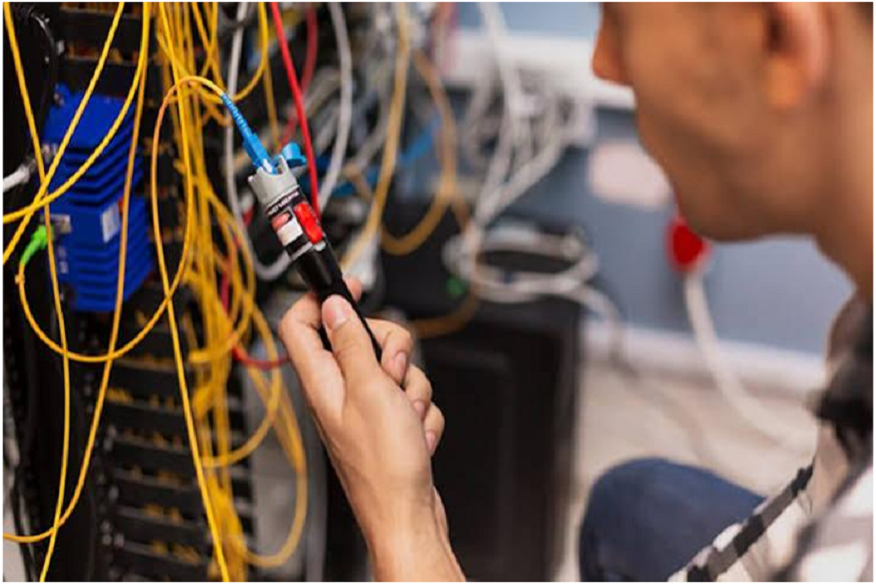
A fiber optic cable installer should test every completed link before the new network is fully placed into service. Testing can find high signal loss, damaged sections, weak splices, or connector problems that a visual check may miss. Fixing those issues during the project is usually easier than finding them after users report slow performance. Clear results also confirm that each link meets the design target and is ready for expected traffic.
Good documentation keeps that value useful after installation. Final drawings, cable labels, strand records, test reports, and equipment details give future technicians a reliable starting point. When the business needs more bandwidth, they can see which fibers are active, which routes have space, and where new equipment can connect. This avoids repeated surveys and unnecessary replacement work. It also helps internal teams plan future upgrades with better information and fewer unknowns.
Long-Term Capacity Needs a Stable Foundation

Bandwidth growth becomes easier when the physical network is treated as long-term infrastructure. Strong planning, suitable fiber, accessible pathways, careful installation, and complete testing all reduce the need for frequent rebuilding. They also help commercial teams add users, devices, and applications with less risk. A stable backbone gives the business more flexibility while keeping future upgrades focused, predictable, and less disruptive to normal work across the property each day and during busy periods.
CMC Communications supports San Antonio commercial properties with fiber design, installation, testing, structured cabling, and network planning. Their team can review current infrastructure, identify capacity limits, plan practical pathways, and build links that support future growth. By combining organized fieldwork with clear records and tested performance, they help businesses improve bandwidth without repeatedly replacing major parts of the network or causing avoidable disruption during each planned technology upgrade or future business expansion.
Read More: What Is an AI Customer Service Assistant and How Does It Improve Support?
Frequently Asked Questions
Question: Why is fiber useful for growing commercial networks?
Answer: Fiber can carry large amounts of data over long distances with low signal loss. It creates a strong backbone for cloud tools, wireless networks, cameras, voice systems, and future equipment. Final performance still depends on good planning, suitable hardware, careful installation, and proper testing.
Question: Does installing fiber remove every network bottleneck?
Answer: Not always. Slow switches, limited uplinks, poor connections, damaged cables, or crowded pathways can still reduce performance. The whole network should be reviewed so the cable, equipment, routes, and connection points work together and support the expected level of traffic.
Question: How can businesses avoid rebuilding cable pathways later?
Answer: They can include extra conduit or tray space, accessible routes, organized telecom rooms, and reasonable spare capacity in the first plan. Accurate drawings and clear labels also make future additions easier because technicians can use existing pathways without reopening large finished areas.
Question: When should installed fiber links be tested again?
Answer: Retesting is useful after equipment changes, building work, cable moves, performance complaints, or major network upgrades. Regular checks may also find damage or signal loss before it affects more users. New results should be compared with the original test records whenever possible.
Question: What records should businesses keep after installation?
Answer: Businesses should keep final drawings, cable labels, strand details, equipment information, pathway records, and test reports. These documents help future technicians understand the network, find available capacity, plan upgrades, and avoid replacing links that are still suitable for continued use.